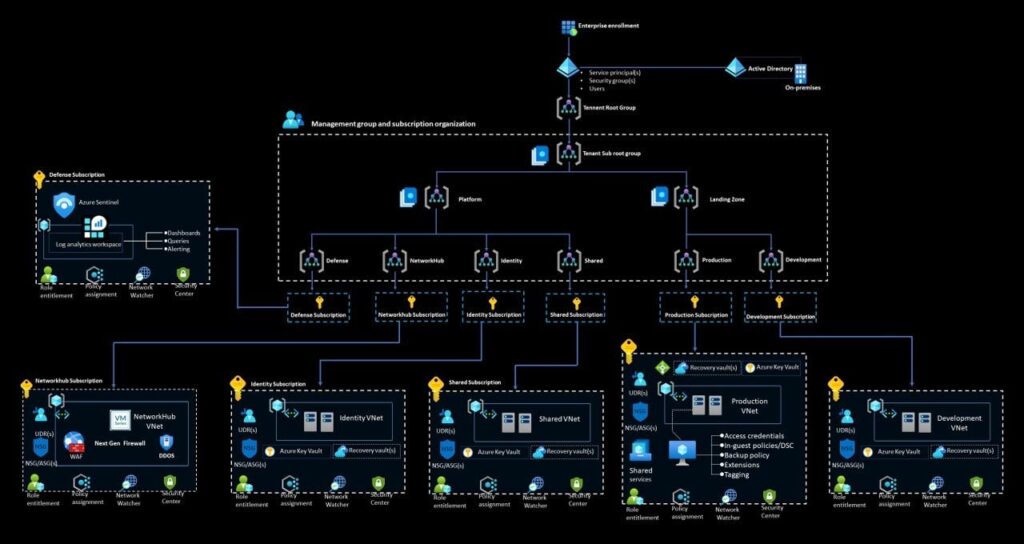
Moving your business to the cloud can feel like trying to assemble furniture without instructions – there are so many pieces and you’re never quite sure if you’re doing it right. That’s exactly why Microsoft created the well-structured azure landing zone accelerator – it’s basically a pre-built template that gives you a solid foundation to build on. Instead of starting from scratch and potentially making costly mistakes, you get a proven framework that follows Microsoft’s best practices. Research from Forrester shows that companies using landing zones reduce their cloud setup time by up to 65% compared to custom implementations, while also avoiding common security and compliance pitfalls.
What Makes a Landing Zone Different from Regular Cloud Setup
When most people think about moving to the cloud, they imagine just creating some virtual machines and calling it a day. But that’s like building a house by starting with the walls instead of the foundation. A landing zone is more like having the electrical, plumbing, and structural framework already in place before you start adding rooms.
The accelerator includes pre-configured network architectures, security policies, identity management systems, and governance frameworks. These aren’t just random configurations either – they’re based on thousands of real-world deployments and reflect what actually works in practice. Microsoft’s Customer Advisory Team analyzed over 10,000 enterprise cloud migrations and built these patterns from the most successful implementations.
The Technical Building Blocks That Actually Matter
At its core, the landing zone accelerator sets up what’s called a hub-and-spoke network architecture. The hub acts like a central connection point where you put shared services like firewalls, VPN gateways, and monitoring tools. The spokes are where your actual applications live, and they connect back to the hub for shared resources.
This design isn’t just for show – it solves real problems. When you have multiple teams or applications, they can operate independently in their own spokes while still benefiting from centralized security and monitoring. It also makes it way easier to manage network traffic and apply consistent security policies across everything.
The accelerator also sets up Azure Policy assignments automatically. These are basically rules that prevent people from accidentally creating resources that don’t meet your company’s standards. For example, it can automatically block anyone from creating virtual machines in regions where you don’t want data stored, or prevent the use of expensive resource types without approval.
How It Handles Identity and Security From Day One
One of the biggest headaches in cloud setup is getting identity management right. The landing zone accelerator creates a proper Azure Active Directory structure with role-based access controls that actually make sense. Instead of everyone being an admin (which happens way too often), it sets up different permission levels for different job roles.
The security setup includes what Microsoft calls “defense in depth” – multiple layers of protection instead of relying on just one security measure. You get network security groups that act like firewalls for your subnets, Azure Security Center monitoring that watches for threats, and Key Vault integration for managing secrets and certificates properly.
What’s really smart is how it handles compliance frameworks. If your industry has specific requirements like PCI DSS for payment processing or HIPAA for healthcare, the accelerator can apply the relevant policy templates automatically. This means you’re not starting from zero when it comes to meeting regulatory requirements.
The Automation That Saves You From Repetitive Tasks
Here’s where things get really interesting – the accelerator uses Infrastructure as Code principles to make everything repeatable. Instead of clicking through the Azure portal for hours to set things up, everything is defined in ARM templates or Bicep files that can be deployed automatically.
This means when you need to create a new environment for testing or a new region for expansion, you’re not manually rebuilding everything. You just run the deployment scripts and get a consistent environment that matches your production setup. Microsoft’s internal studies show this reduces environment provisioning time from weeks to hours.
The monitoring and alerting setup is particularly clever. It automatically creates dashboards that show the health of your infrastructure and sets up alerts for common problems before they become outages. The accelerator includes over 50 pre-configured alert rules based on real-world operational experience.
How It Scales With Your Business Needs
One thing that makes the landing zone accelerator special is how it grows with you. The initial setup works great for small deployments, but it’s architected to handle enterprise-scale requirements without needing to rebuild everything.
The subscription management model is designed around Azure’s billing and governance capabilities. As your organization grows, you can add new subscriptions for different departments or projects while maintaining consistent policies and security controls across everything. This is way better than trying to retrofit governance onto an existing messy cloud environment.
Read More: How to Operationalize Threat Intel in a Multicloud Environment