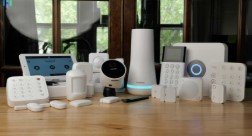
A home security system should solve practical problems, not create more notifications, subscriptions, or devices than your household can realistically manage. Before comparing brands or camera features, consider how a professionally planned home security system installation could fit your property, routine, and comfort level with connected technology.
The right setup for a small apartment may be very different from that for a multi-story home with a garage, pets, children, or frequent travel. Start with the risks you want to address, then select equipment and services that provide useful coverage without unnecessary complexity.
Table of Contents
- Start With Your Home’s Layout
- Learn What Each Component Does
- Compare Installation Options
- Choose a Monitoring Approach
- Check Power and Connectivity
- Review Privacy and Account Security
- Calculate the Full Cost
- Ask Questions Before Buying
- Avoid Common Mistakes
Start With Your Home’s Layout
Walk around the property before shopping. Count exterior doors, accessible windows, sliding doors, garage access points, gates, and detached structures. Also identify dark side yards, blind corners, and areas where landscaping, walls, or parked vehicles could block a camera’s view. A layered approach to doors, windows, lighting, and monitoring is often more useful than relying on a single camera.
Make note of weak Wi-Fi areas, available outlets, and locations that may need weather-rated equipment. Consider daily life as well. Pets can affect motion-sensor placement, renters may need removable devices, and older adults or children may benefit from simple arming controls and separate user access.
Learn What Each Component Does
You do not need every device offered in a security package. A well-sized system protects the most important areas and gives clear, manageable alerts.
- Control panel or hub: Connects compatible devices and provides a central point for arming or disarming.
- Door and window sensors: Alert the system when a protected entry point opens.
- Motion sensors: Monitor interior areas such as hallways or main living spaces.
- Cameras and video doorbells: Provide live views and, when enabled, recorded video around entrances or shared areas.
- Glass-break sensors: Can add coverage in rooms with large windows or sliding glass doors.
- Smoke, heat, and carbon monoxide detectors: Extend protection beyond intrusion detection.
- Smart locks and lighting: Can support controlled access, scheduled lighting, and arrival routines.
Compare DIY and Professional Installation
DIY installation can work well for renters, smaller homes, and people who want portable equipment. It may also make it easier to add sensors later. However, you are responsible for placement, testing, troubleshooting, and confirming that each device communicates reliably with the hub.
Professional installation may be a better fit for large homes, hardwired cameras, detached garages, unusual layouts, or households that prefer hands-on guidance. An installer can help position devices, verify coverage, and explain how to use the system. Ask whether the equipment is owned, leased, or tied to an ongoing service plan.
Choose Between Self-Monitoring and Professional Monitoring
Self-monitoring sends alerts directly to you, usually through an app. It can reduce monthly costs, but it assumes someone can notice the alert and decide what to do. Professional monitoring routes certain alarms to a monitoring center that follows the provider’s response procedures, which may include contacting designated users or requesting emergency assistance.
Your choice should reflect your availability. Professional monitoring can be appealing for frequent travelers or households that cannot reliably respond to alerts. Self-monitoring may suit people who want more control and fewer recurring fees. Local alarm permits, verification policies, and emergency-response practices can vary, so check local requirements before activation.
Security measures can also influence target selection. In studies involving incarcerated burglars, respondents reported considering visible signs of security, such as alarms and surveillance equipment, when evaluating a property, as described in research on offender decision-making. Visibility is not a guarantee of prevention, but it supports the value of layered protection.
Check Power, Internet, and Cellular Backup
A connected system is only as dependable as its power and communication options. Ask whether the hub includes battery backup, how long it is expected to operate during an outage, and whether cellular backup is available if home internet service fails. Confirm what cameras can do without Wi-Fi, including whether they can record locally or only send live alerts when connected.
Place the hub and router where they receive a strong signal, then test alerts from every sensor and camera location. Battery-powered devices also need a maintenance plan, since low battery levels can cause coverage gaps or frequent notifications.
Review Privacy and Account Security
Cameras and connected sensors can collect sensitive household information. Before purchasing, review the provider’s storage settings, sharing controls, account recovery process, and software-update practices. Use a unique password for the security account, enable two-factor authentication when available, and give each household member a separate login rather than sharing one password.
Look for camera privacy modes, clear cloud retention settings, local storage options where appropriate, and simple ways to revoke access when a tenant, guest, employee, or former household member no longer needs it.
Calculate the Full Cost
Compare more than the equipment price. Your budget may also include installation labor, professional monitoring, cellular service, video storage, extra sensors, replacement batteries, service visits, permits, activation charges, and cancellation terms. Review the first-year cost and the estimated three-year cost to see whether introductory offers remain affordable.
Ask These Questions Before Buying
- Who owns the equipment, and can it move with you?
- Is a contract required, and what happens if service is canceled?
- What does the monthly fee include?
- Is video storage included, or is it charged separately?
- How does the system operate during power or internet outages?
- Can household members have separate access?
- Are permits required where you live?
- What support and warranty coverage are available after installation?
Avoid Common Buying Mistakes
Do not buy cameras before assessing entry points, choose equipment only for its resolution, or overlook subscriptions and storage fees. Avoid placing cameras where glare, tree growth, or walls block the view. Test alerts after installation, update emergency contacts when circumstances change, and review the system periodically. A modest, well-maintained system that fits everyday life is usually more valuable than an expensive setup that goes unchecked.
Read Also:- techinfobusiness.com